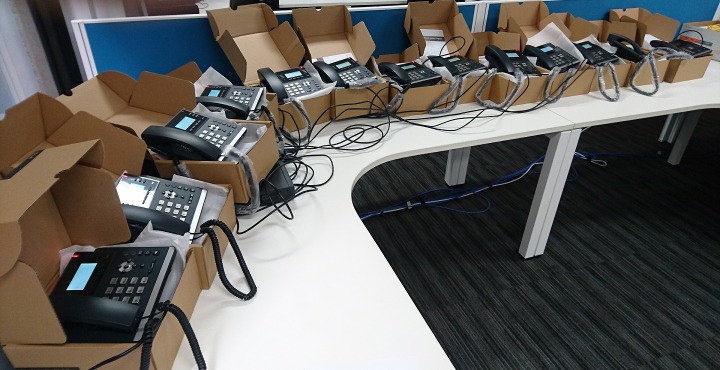
Another day and another rollout of AAPT Bizphone handsets…
Just finishing up the configuration of these VoIP handsets before we install them onsite. A perfect solution for a small and medium offices.

Another day and another rollout of AAPT Bizphone handsets…
Just finishing up the configuration of these VoIP handsets before we install them onsite. A perfect solution for a small and medium offices.

Dropbox will sync any files that are added to it.
So, if a virus or malware encrypts your files they will upload to dropbox and then sync to all your other devices.
Luckily for us there is a solution!
Dropbox keeps a copy of all changes made to your files for 30 days. (or even longer if you use Dropbox Business)
With this it is possible to restore individual or a large number of files to the way they were prior to infection.
Here is a great link to explain how to go about recovering your files: https://www.dropbox.com/en/help/8408
One last point – make sure you get your PC cleaned of the malware before doing any of this! Otherwise it will continue to re-infect everything!
Recently a number of people asked me for simpler ways to connect a variety of different devices to TV’s.
Whether it is for presentations in the board room or just playing Netflix and photos at home, shedding the need for cables while making it easy for anyone to connect is a cool idea…and Miracast is a protocol or standard for doing just this.
While it’s very easy to do, many people aren’t aware they already have everything they need to do it now.
Most smart TV’s have Miracast built into them already and most relatively new Windows notebooks also support Miracast, as do Android phones and tablets. You don’t even need a wireless network as Miracast creates its own direct device to device connection.
There’s a number of inexpensive dongles you can plug into the TV that support Miracast. These typically look like an oversized USB stick and plug into HDMI ports on your TV.
Some of the better known ones include the Microsoft Wireless Display Adaptor, Netgear Push2TV as well as options from Asus, Belkin & Samsung. A number of Media Players people already have connected to their TV also support mirroring.
Some dongles also support Apple Airplay giving iPhone & iPad users similar functionality too.
Different TV brands call it by different names such as LG ‘Screen share’ and Samsung ‘AllShare’. Irrespective of what it’s called, you typically use the input button on your remote control to access a Screen Mirroring or Casting function.
On a Windows PC you typically need to do some, or all of the following:
Android devices have intuitive setup procedures, but they vary between brands and models. If your device doesn’t have a simple “quick connect” function, just go to “Settings” and you’ll find a ‘Device connection’ and/or ‘Screen mirroring’ function.
While easy to get up and running, Chromecast is limited to displaying specific applications, not mirroring your entire screen. It also struggles playing some types of content too.
My advice, give it a try. You’ll be surprised by how simple it can be and the number of things you can use it for!

Many people have found the default browsers on their PC’s (Internet Explorer or Edge) and Apple Mac (Safari) appear slow and unresponsive on particular websites. While some time consuming fine tuning may alleviate the issues to some degree. Often the quickest and best results come from using a different browser.
Download Chrome: https://www.google.com.au/chrome
Download Firefox: https://www.mozilla.org
So, Try them! You may be surprised with the difference.
Many of us now have to deal with passwords for a large number of different systems, be it work, CRM, email, Banking, eBay, Paypal, Facebook etc. The trouble is how do we deal with them all? It’s tempting to reuse the same password for many or all of them but this can be a serious mistake. If any one of your accounts is compromised, then you stand to have all of the compromised.
So, how to deal with all these different passwords? Well here are your options, and some are not as silly as they sound.
BTW. Password are like underwear. You should change them regularly…or at least don’t admit that you don’t!
Many of us now have to deal with passwords for a large number of different systems be it work systems, email, CRM, Banking, eBay, Paypal etc. Isn’t modern technology great? In part two of this article we’ll cover better ways of dealing with the number of passwords. In the interim, let’s look at some best practices for improving the passwords we are currently using.
Here’s a list of the most common passwords. Hopefully you don’t have any of these?
|
Most common passwords |
||
| 123456 | 123456789 | qwerty |
| 12345678 | 111111 | 1234567890 |
| 1234567 | password | 123123 |
| 987654321 | qwertyuiop | mynoob |
| 123321 | 666666 | 18atcskd2w |
| 7777777 | 1q2w3e4r | 654321 |
| 555555 | 3rjs1la7qe | |
| 1q2w3e4r5t | 123qwe | zxcvbnm |
| 1q2w3e | ||
Use different passwords
The worst thing you can do, aside from telling other people your password, is to use just one password for everything. If you or one of your sites are compromised, then you may have just lost control of your life!
BTW. It amazes me that some sites and services still store passwords in a format allowing support staff to read them back to you! Imagine if you also used that as your banking password!
Use Strong passwords
What to avoid
Avoid using Names, Places and dictionaries.
If your password uses personal information, much of this is available on Social Media. Worse still, some systems require you to answer questions in case you forget your password. This question will tell the hacker what information to go look for online.
Related tips:
It feels like we blinked and suddenly the end of the year is upon us!
On behalf of everyone here at Insight Integration I’d like to say thank you for your support throughout 2016, and we look forward to working with you again in the New Year.
We are having our office Christmas party next Friday 23rd Dec and will be closing the support desk from 1:00pm. Support requests can still be logged as normal via email, web portal or phone (voicemail only) and we will address them when we return for work on Wednesday 28th.
Apart from this we will be open as per normal 8am to 6pm over the Christmas period with the exception of public holidays.
As always our emergency phone support service will also be available over this period.
Windows Key + D – Missing the desktop? This will hide all windows and show you the desktop. Press it again and it will bring back the same windows that were active earlier.